23 September 2025
Why is performance important on a Shopify site?
 A Shopify site’s performance is a direct driver of conversions and revenue. Fast load times drastically reduce bounce rates and improve the user experience, which encourages visitors to browse more pages and complete their purchases. Web performance can therefore directly help increase your conversion rate. Google also factors speed into its ranking algorithm: a high-performing site enjoys better organic visibility, which translates to more qualified traffic.
Beyond customer acquisition, your Shopify site’s performance shapes how your brand is perceived. A smooth, responsive, and optimized site inspires trust and professionalism, whereas slow loading times can damage a brand’s premium image. On Shopify, optimizing themes, third-party apps, and front-end infrastructure is therefore strategic for maximizing profitability and supporting e-commerce growth.
DATASOLUTION has completed more than 70 Shopify projects and places performance at the heart of its development processes. Here, we’ll share a few best practices we use to ensure strong performance for your Shopify project.
Shopify Performance: How Do You Measure It?
Here are the 4 key performance metrics to monitor on a Shopify site —especially to optimize your site’s loading speed Shopify site:
- LCP (Largest Contentful Paint): Measures the time it takes to display the main visible element (image, video, or block of text). Ideally <, 2.5 seconds.
- FID (First Input Delay): Measures the site’s responsiveness—that is, the time between the user’s first interaction (click, scroll, keystroke) and the browser’s response. Target <, 100 ms.
- CLS (Cumulative Layout Shift): Measures visual stability—that is, whether page elements move while the page is loading (e.g., a button that shifts). Target <, 0.1.
- TTI (Time to Interactive): measures the time it takes for the page to become fully usable (smooth interactions, scripts loaded).
Overall, at DATASOLUTION, we use these two tools to measure performance:
- Google PageSpeed Insights (simplified, accessible to everyone): Provides a mobile and desktop score based on the Core Web Vitals, along with optimization tips.
- Google Lighthouse (more technical, in Chrome DevTools): a more comprehensive analysis (SEO, accessibility, PWA, best practices) with detailed reports and metrics under simulated conditions.
Google Lighthouse can be used directly from Chrome DevTools: simply open the developer tools (right-click >, “Inspect,” or press F12), then go to the Lighthouse tab to run an audit.
The tool runs automated tests on the page (performance, accessibility, SEO, best practices, PWA) and provides a detailed report with scores and concrete recommendations.
Unlike PageSpeed Insights, which focuses primarily on Core Web Vitals and server-side user experience, Lighthouse simulates real-world browsing conditions (mobile/desktop, slow network, CPU-constrained) and helps pinpoint specific bottlenecks in the code, rendering, or resources.
At DATASOLUTION, we regularly conduct audits of Shopify projects and consistently identify the following optimization issues:
- Unoptimized images or videos: This is one of the most common causes of slow loading times. Images that are too large or poorly compressed slow down page loading, especially on mobile devices.
- The use of heavy JavaScript libraries: When a website loads large JS files (such as jQuery or Moment.js) or unused code, it overloads the browser and slows down interactivity.
- Web fonts that are too large or too numerous: Loading multiple font families or variants can significantly slow down the site, especially if they aren’t properly optimized or loaded with `font-display`.
- Too many third-party apps installed: Each app can inject its own scripts and styles. Having too many apps running at the same time eventually slows down the site, even if some of them are rarely used.
- A poorly optimized theme: Some themes include many CSS and JS files, which are sometimes unminified or poorly organized, slowing down page rendering.
- Excessive network requests: Every additional tracking pixel, API call, or marketing script adds to the list of files that need to be loaded, which directly impacts the site’s speed.
- Improperly configured lazy loading: If critical images—such as the hero image on the homepage—are loaded too late, it negatively impacts LCP (Largest Contentful Paint) and the user experience.
- Non-critical CSS that blocks rendering: When all the CSS for a block is loaded before the page is displayed, the user waits unnecessarily. Extracting and prioritizing essential CSS can make a big difference.
- Liquid sections or snippets that are too heavy: Certain poorly optimized loops or calls in the theme code can significantly slow down page rendering on the Shopify server side.
- Animations or carousels that are too resource-intensive —such as sliders, background videos, or complex visual effects—consume a lot of resources and can cause layout shifts (CLS) or slow down scrolling.
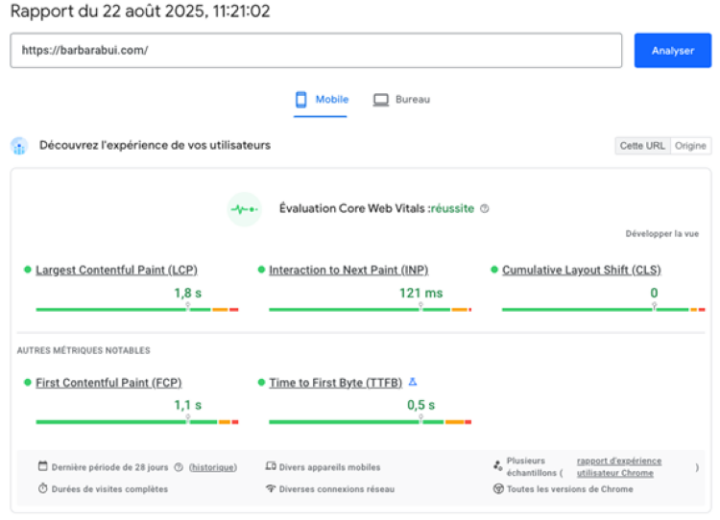
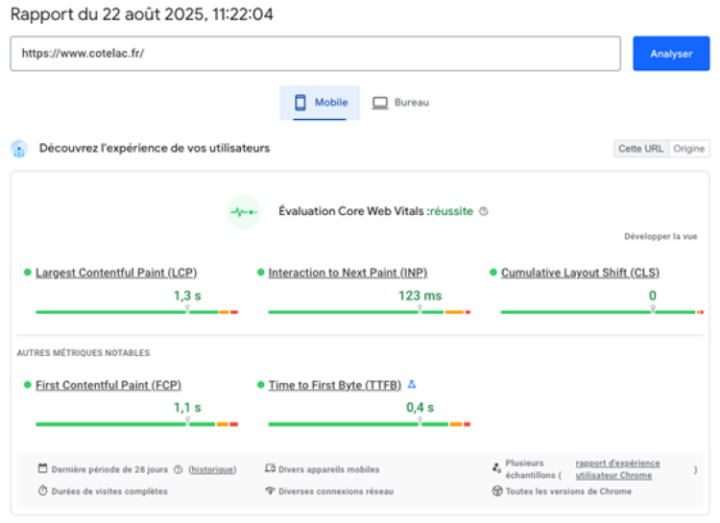
Some examples of high-performing websites developed by DATASOLUTION
We implement performance optimization strategies during the initial website development phase and conduct regular audits for our clients. Performance is an aspect of digital marketing that can change suddenly and requires constant attention—just like SEO, accessibility, and the GDPR.
Here is an example of a satisfactory score achieved by our client, Barbara Bui, in August, which requires constant attention as new content is developed and implemented.
And also at our client Cotélac, also in August.
There are different types of web performance tests:
A standard performance test measures a website’s speed, responsiveness, and stability under normal usage conditions (load time, responsiveness, and other metrics, such as Core Web Vitals).
A load test evaluates a website’s ability to handle high volumes of simultaneous traffic by simulating a large number of users to identify saturation thresholds and breaking points.

Why
How do I run a load test on Shopify?
Shopify is built on a SaaS architecture hosted on the Google Cloud Platform that is fully self-scaling: the infrastructure automatically adapts to traffic spikes without any technical intervention, ensuring very high availability.
Nevertheless, a load test remains relevant—not to test Shopify itself, but to verify the robustness of the overall ecosystem: theme, front end, and third-party integrations (ERP, CRM, payments, apps). It is these elements—outside of Shopify’s core—that can reveal points of failure during periods of high traffic.
How do you perform a load test?
A load test is conducted by simulating a large number of concurrent users to observe how the website and its integrations perform. Realistic scenarios (browsing, adding items to the cart, checkout) are defined, and then the volume is gradually increased.
At DATASOLUTION, we use two leading tools for load testing on Shopify: Grafana Cloud k6 (open source, highly flexible) and Gatling (powerful, developer-focused, with excellent management of large-scale traffic from different locations).
Please note that on Shopify (even Shopify Plus), you can’t just “run” a load test without prior notice—doing so may cause the system to lock up. Generally, you’ll need to go through Shopify Plus Support to set up a supervised load test.
What are the main tests that should be implemented?
Here are 5 key load testing scenarios for a Shopify e-commerce site:
• High-traffic browsing: Thousands of users viewing the home page and category pages simultaneously.
• Intensive product search: simultaneous queries in the internal search engine.
• Massive shopping cart: Users adding products to their carts at the same time.
• Concurrent checkout: hundreds of customers confirming their orders and proceeding to checkout.
• Combined peak (sale day): a high volume of users navigating the site, adding items to their carts, and checking out in rapid succession.
These tests help verify the stability of the site and its ecosystem under extreme conditions. By simulating thousands of concurrent users, we identify points of failure (checkout, third-party integrations, front-end scripts) and ensure that the customer journey remains smooth, without crashes or major slowdowns.
They also help manage risk during high-traffic sales events (sales, Black Friday, product launches). By testing in advance, we avoid unpleasant surprises on the big day, safeguard revenue, and protect our brand image by ensuring a stable experience even under heavy traffic.
Need more information?
Related articles
Visit the blog
ChatGPT Ads on Shopify and HubSpot: What This Means for E-commerce Businesses and Marketing Teams in France
02/10/2026
Fine-tuning LLMs in the Enterprise: Better Than a Frontier Model?
28/09/2026

OroMomentum: AI for B2B efficiency
22/09/2026

AI: The 5 Top Stories of Summer 2026
17/09/2026

Content management on Magento: how to give marketing teams back control with Hyvä CMS
17/08/2026