26 March 2025
Everything You Need to Know About FAB-DIS: An Interview with MaPS System
The FAB-DIS format has become essential for structuring product data exchanges in the industry. However, understanding and implementing it can be complex, whether it involves creating compliant files or managing those received.
So we asked Frédéric Eckert, Product Manager at Maps Systems— a DATASOLUTION partner—to tell us a little more about FAB-DIS and how it integrates with PIM and MDM projects.
What is the MaPS System?
DATASOLUTION
Hello, Frédéric! Thank you for agreeing to this interview with DATASOLUTION. To start, could you introduce yourself and tell us about MaPS System?
Frédéric Eckert
As for me, my career has mainly focused on e-commerce and digital marketing. In particular, I led a pure-play e-commerce company for 8 years, and then held positions as an e-commerce and digital marketing manager at various companies. Then, a little over 3 years ago, I joined MaPS System as a Key Account Project Manager. Following several structural changes within the company, I joined the Product department about a year and a half ago to oversee change management and various major software development and enhancement projects.
At MaPS System, we are a software provider that helps companies optimize the centralization of their strategic master data: product information, visual assets, organizational data, and more. Today, we offer an all-in-one platform that integrates MDM (Master Data Management), PIM (Product Information Management), and DAM (Digital Asset Management). We enable manufacturers, brands, retailers, and service companies to respond as flexibly and efficiently as possible to all the growing demands of partners and markets (quality, compliance, reliability, speed of data access, etc.).
What is the FAB-DIS format?
DATASOLUTION
As part of their PIM or MDM projects, many customers and prospects ask us about the FAB-DIS format. Can you tell us what FAB-DIS is?
Frédéric Eckert
FAB-DIS is an acronym standing for “FABricants” and “DIStributors.” It refers to a standardized data exchange format designed to facilitate the transmission of product information between manufacturers and distributors, particularly in the construction, industrial, and infrastructure sectors.
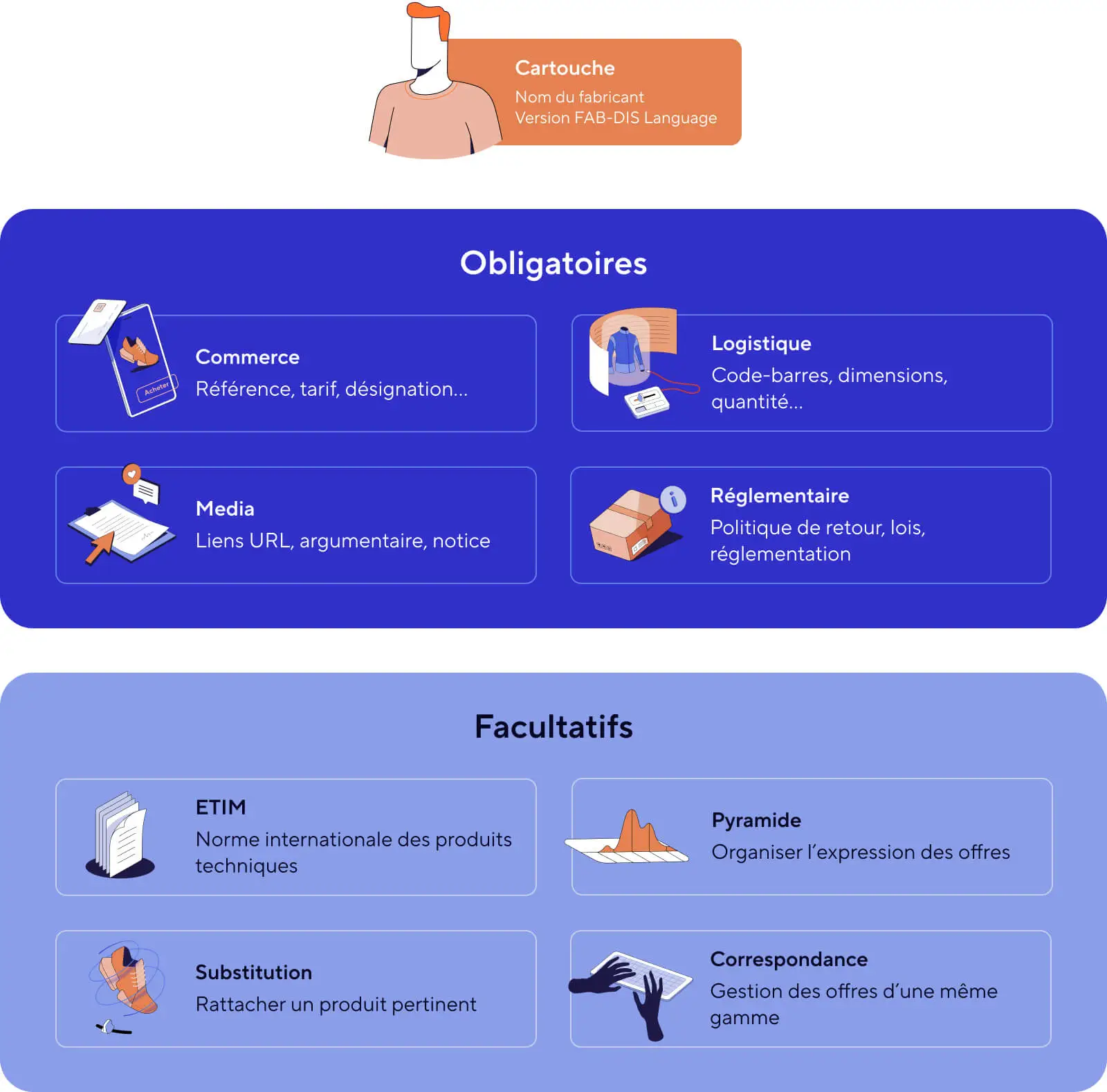
This format takes the form of an Excel .xlsx file, structured into several tabs called “blocks,” covering areas such as sales, logistics, media, and regulatory data. Adopting this format simplifies and speeds up product listing, ensuring higher data quality and shorter time-to-market.
What are the advantages of the FAB-DIS format?
DATASOLUTION
So what are the advantages of FAB-DIS?
Frédéric Eckert
This standardization facilitates the exchange of product data between manufacturers and distributors, thereby improving the efficiency and reliability of business processes.
In particular, FAB-DIS allows you to:
- to standardize product data management among manufacturers and distributors
- to improve the quality and reliability of data to prevent errors
- to speed up the time it takes for products to reach the market by making it easier to include them in retailers’ catalogs
- to optimize productivity related to data handling and integration operations
- and to ensure that product information complies with regulations
Which industries use the FAB-DIS format?
DATASOLUTION
Which industries will make the most use of the FAB-DIS format?
Frédéric Eckert
The FAB-DIS format is widely used in the construction, industrial, and infrastructure sectors. It is used by various types of companies, including:
- Manufacturers of electrical equipment, plumbing fixtures, heating systems, DIY tools, etc.
- Distributors, wholesalers, and retailers specializing in the sale of building materials, electrical equipment, bathroom fixtures, etc.
More specifically, the following sectors can be cited:
- Electrical: Electrical equipment, lighting systems.
- Plumbing: Plumbing fixtures, bathroom equipment.
- Heating and Air Conditioning: Heating, Ventilation, and Air Conditioning Systems.
- Tools and DIY: Hand tools and power tools, DIY equipment.
- Decor: Interior Design Materials and Accessories.
What are the differences between FAB-DIS and ETIM?
DATASOLUTION
There are other types of classifications; ETIM comes to mind, for example. What are the differences between FAB-DIS and ETIM?
Frédéric Eckert
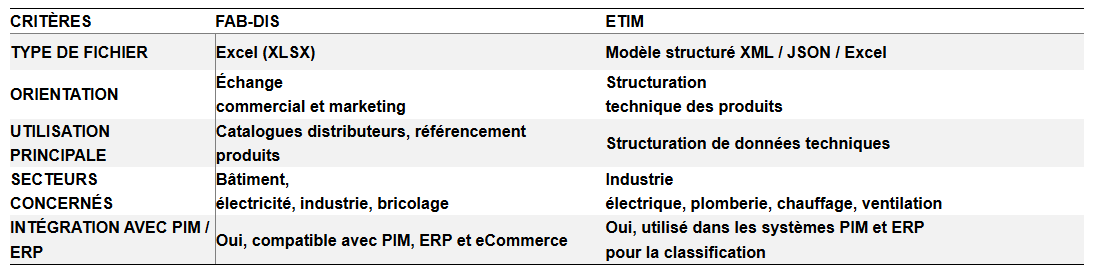
The FAB-DIS format and classifications such as ETIM share a common goal: to structure the exchange of product data. However, they differ in their purpose, structure, and scope of application.
The Purpose
FAB-DIS aims to facilitate the exchange of product data between business partners—namely, manufacturers and distributors.
ETIM (“Electro-Technical Information Model”) remains a technical classification system that allows products to be structured according to a standardized model based on characteristics, regardless of business relationships.
Structure and Content
The FAB-DIS file follows a standardized structure with data blocks classified by use: mandatory blocks (Retail, Logistics, Media, Regulatory) and conditional blocks (Variants, Correspondence, Discontinuation, Substitution, etc.). Each product is described in full detail (commercial, technical, logistical, regulatory, etc.) to facilitate the integration of product data into retailers’ systems.
ETIM is based on a hierarchical structure of products organized into classes, groups, and technical characteristics: a product class (e.g., LED lamp = ETIM EC000109), standardized technical characteristics (e.g., power in watts, color temperature…), and associated values (e.g., 10W, 4000K…). Each product belongs to a single ETIM class and must be described using specific attributes to ensure data consistency, thereby enabling a universal and standardized interpretation of a product’s technical specifications.
Scope
Are the FAB-DIS and ETIM formats complementary?
DATASOLUTION
Thank you for the clarification. Can these two formats, FAB-Dis and ETIM, be used together?
Frédéric Eckert
The FAB-DIS and ETIM formats are complementary and can be used together:
- A FAB-DIS file may include an ETIM classification to improve the readability of technical data.
- A manufacturer can organize its products using ETIM, then export them to FAB-DIS to share them with its distributors
Example: A lighting manufacturer uses ETIM to classify its LED lamps (e.g., ETIM class EC000109). It then generates a FAB-DIS file to send to its distributors, containing all the necessary commercial, logistical, and technical information.
In fact, the PIM MaPS System allows you to integrate both models to effectively manage product data.
What factors should be considered when using the FAB-DIS format?
DATASOLUTION
Getting back to FAB-DIS, are there any specific points to keep in mind when using it?
Frédéric Eckert
Like any standard, FAB-DIS requires compliance with several requirements.
Data Structuring
- Follow the standardized structure: FAB-DIS files are organized into blocks, represented by tabs in .xlsx format (Commerce, Logistics, Regulatory, Media, etc.).
- Fill out each section correctly: omissions or incorrect formatting can lead to import errors.
- Avoid duplicates or inconsistencies between data blocks.
Example: A product without dimensions or weight in the Logistics module can cause problems for the distributor’s inventory management.
Data Quality and Compliance
- Ensuring the accuracy of information: A product with inaccurate information may be listed incorrectly or fail to meet market expectations.
- Comply with regulatory standards: certifications, CE marks, and environmental fees must be reported correctly.
- Verify compliance with ETIM: Certain technical data must comply with ETIM classifications.
(PI if needed: It is integrated into various systems and platforms where it is used to filter products and extract qualitative information.)
Example: A description that is too long may exceed the limit set by FAB-DIS and be rejected by a distributor.
Regular updates
- Keep files up to date: Product changes (prices, inventory, new SKUs) must be regularly incorporated.
- Stay up to date on changes to the FAB-DIS format: Version 3.0 introduced new requirements and options to improve data exchange (reorganization, removal, and addition of blocks).
- Anticipate changes to the product line and product substitutions.
Example: A discontinued product must be listed in the “C05 – Discontinued” section, along with a replacement product, if available.
Automation and Pre-export Inspection
- Avoid manual data entry to minimize human error.
- Use a FAB-DIS Inside-certified solution (such as MaPS System) to automate the creation and validation of files.
- Test the files before sending them using a tool such as Easy-Check by FAB-DIS to identify and correct errors in advance.
Example: A file that is poorly structured or contains incomplete data may be rejected by the distributor, resulting in delays in getting the products online.
MaPS System enables manufacturers to generate, validate, and export FAB-DIS files in record time, allowing them to focus on their core business rather than on complex data entry tasks


MaPS System and FAB-DIS
DATASOLUTION
More specifically, how does the MaPS System platform support the use of FAB-DIS?
Frédéric Eckert
MaPS System is a FAB-DIS Inside-certified solution designed to simplify and automate the entire FAB-DIS file management process.
With its integrated PIM, MDM, and DAM, the MaPS platform enables users to:
- Centralize and organize product data in a single repository
- Automate the creation of FAB-DIS files in accordance with the latest version of the standard
- Ensure data quality and compliance before exporting
- Facilitate the exchange and updating of files with distributors and partners
From an operational standpoint, the MaPS System solution meets manufacturers’ needs through its DataExport module, which allows users to generate 100% compliant FAB-DIS files for export with just a few clicks —without the need for time-consuming manual intervention—and, secondly, via its DataImport module, which imports files in the FAB-DIS 3.0 standard. These operations can be automated.
DATASOLUTION
And how does the MaPS System platform ensure that FAB-DIS files are compliant?
Frédéric Eckert
Compliance with FAB-DIS file standards is essential to prevent rejections and speed up product onboarding with distributors. The MaPS System platform ensures this compliance through several key features:
- Automated quality control: Through data exchanges between Easy-Check and the platform, combined with a customizable filter application, errors and inconsistencies are detected prior to export (missing data, incorrect formats, etc.).
- Validation with Easy-Check by FAB-DIS: MaPS System maintains a direct communication channel with this validation tool, allowing it to retrieve the validation status almost instantly and obtain a compliance number required to process the files.
- Compliance with FAB-DIS blocks: The file structure complies with the format requirements (Commerce, Logistics, Media, Regulatory, etc.).
- Automatic Updates: The platform evolves in line with new versions of FAB-DIS to ensure ongoing compliance with standards.
As a result, MaPS System users can be confident that their files have been validated and are compliant before being sent to distributors, thereby avoiding back-and-forth communication and wasted time.
DATASOLUTION
How much time can be saved by generating FAB-DIS using the MaPS System?
Frédéric Eckert
MaPS System saves a considerable amount of time when creating and managing FAB-DIS files, particularly thanks to:
- Automated generation in just a few clicks: No need to manually format an Excel file—it’s all automated.
- An 80% reduction in errors: Fewer back-and-forth exchanges with distributors thanks to quality control via Easy Check
- An average time savings of up to 40% in time-to-market: FAB-DIS files are validated more quickly and can be used directly by distributors.
- Bulk file updates: With the PIM, changes (prices, features, descriptions) are applied simultaneously to multiple products without manual intervention.
- Easier updates to the MaPS product database by importing FabDis files from suppliers
In summary, MaPS System enables manufacturers to generate, validate, and export FAB-DIS files in record time, allowing them to focus on their core business rather than on complex data entry tasks.
DATASOLUTION
One last question: Why use MaPS System to manage the FAB-DIS and ETIM formats?
Frédéric Eckert
Certified as FAB-DIS Inside, the MaPS System platform complies with all the model’s requirements and allows users to centralize, organize, and export data in several formats:
- Management of the latest version 3.0 of FAB-DIS
- Unified management of product information, regardless of the required format (FAB-DIS, ETIM, e-commerce, ERP, etc.).
- Automation of the FAB-DIS export process, taking ETIM technical classifications into account.
- Managing Imports in the FAB-DIS 3.0 Format
- Improving Data Reliability Through Quality Controls Using EC
Need more information?
To learn more about PIM/MDM and the FAB-DIS format,
please feel free to contact the teams at MaPS System and DATASOLUTION
Related articles
Visit the blog
ChatGPT Ads on Shopify and HubSpot: What This Means for E-commerce Businesses and Marketing Teams in France
02/10/2026
Fine-tuning LLMs in the Enterprise: Better Than a Frontier Model?
28/09/2026

OroMomentum: AI for B2B efficiency
22/09/2026

AI: The 5 Top Stories of Summer 2026
17/09/2026

Content management on Magento: how to give marketing teams back control with Hyvä CMS
17/08/2026