Migrating Salesforce Commerce Cloud to Shopify: Technical Guide and Case Study
As the first long-standing Shopify Plus partner in France, DATASOLUTION has successfully completed several migrations from Salesforce Commerce Cloud (SFCC). This guide details the real challenges, the pitfalls to avoid, and our methodology for a successful transition.
Key takeaways:
- Migrating from SFCC to Shopify is not simply a change of tool: it’s a complete overhaul of the e-commerce architecture, business processes, and team practices.
- Shopify prioritizes standardization and agility, whereas SFCC allows for deep customization, but it is costly and slow to evolve.
- SEO is a critical factor in the project: without redirects and controlled recovery, traffic loss can reach 30 to 40%.
- The main risks are identified upfront: complex product catalog, advanced promotion engine, highly customized checkout, and complex ERP integrations.
- Success depends on the framework: rigorous gap analysis and technical POCs avoid unpleasant surprises and secure ROI.
Why migrate from SFCC to Shopify?
The question frequently arises: is the total cost of ownership (TCO) deemed too high, is maintenance complex, is the time-to-market for upgrades too long, or is there a desire to benefit from a more agile ecosystem? However, SFCC and Shopify are based on different architectural philosophies. What appears to be a simple migration masks a profound transformation of business and technical processes.
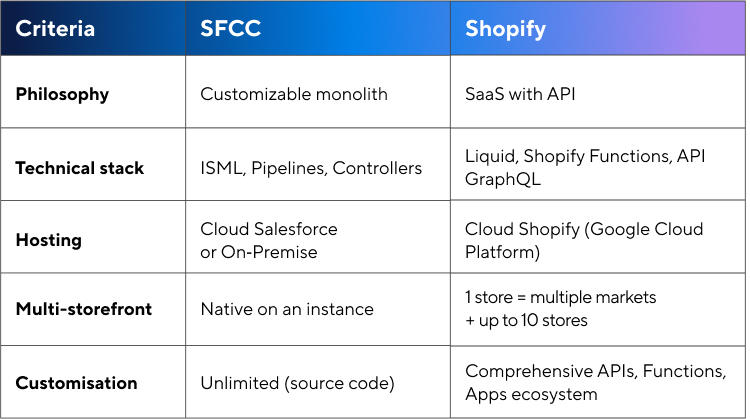
What are the architectural differences between Salesforce and Shopify?
This difference in philosophy has concrete implications for the project’s execution. However, the Shopify ecosystem more than compensates with the richness of its APIs and the maturity of its app marketplace.
What are the major technical challenges of migrating from SFCC to Shopify?
1. Product Data Structure
SFCC allows for complex attribute structures: dynamic attributes, custom groups, and granular localization. Shopify imposes constraints: a maximum of 3 options per product, a limit of 2048 variants, and the use of metafields for additional attributes. A technical B2B catalog will require a redesign of the product modeling, or even the use of specialized applications like Infinite Options.
2. SEO Migration
SFCC allows custom URLs, while Shopify enforces prefixes (/products/, /collections/). This necessitates comprehensive URL mapping, extensive 301 redirects, and post-migration monitoring. A poorly planned migration can result in a 30-40% loss of organic traffic. Conversely, a thorough migration allows traffic to be recovered within 3-6 months.
3. Promotional Engine
SFCC’s promotion engine is very comprehensive: stackable promotions, complex exclusions, and tiered pricing. Shopify Scripts and Functions offer interesting possibilities, but some logic requires third-party applications. Conduct an audit of your promotional rules and classify them: replicable natively, via Scripts/Functions, via an app, or requiring redesign.
4. Multi-market management
SFCC natively manages multiple sites on a single instance. Shopify addresses this need with Shopify Markets: local currencies, languages, dedicated domains, and differentiated pricing, all from a centralized interface. For advanced needs, Shopify Plus allows up to 10 expansion stores. Markets Pro handles customs duties and tax compliance for international markets.
5. ERP Integrations
SFCC customers often have complex integrations (SAP, Oracle). SFCC communicates seamlessly with these systems. Shopify typically requires middleware. Use an iPaaS (Celigo, Boomi, Make.com) to orchestrate the data flows; this abstraction layer facilitates future development.
6. The case of checkout
This is often the major point of contention for SFCC customers accustomed to complete freedom. On SFCC, the checkout is fully customizable: one-page funnel, complex validation logic, and integration of third-party services at any stage.
On Shopify, the checkout has historically been locked down. Shopify Plus provides access to Checkout Extensibility, which allows you to add custom fields, validations, upsells, and integrations via apps or custom code. However, you remain within a framework defined by Shopify; it’s impossible to rebuild a funnel from scratch.
Key point: If your current SFCC checkout incorporates highly specific business logic (proprietary split payment, identity verification, complex B2B flows), carefully audit what can be replicated with Checkout Extensibility before committing. In most standard B2C cases, the Shopify checkout, optimized for conversion, outperforms custom SFCC checkouts.
What is underestimated?
Change management: Teams accustomed to SFCC’s Business Manager will need to adapt to the Shopify admin interface. Plan for dedicated training.
Historical data migration: Importing orders and customers is more complex than anticipated (API rate limits, data without equivalents). Define the scope beforehand: complete history or only active customers?
Application costs: Expect to spend an average of $200 to $400 per month on third-party applications. This cost must be included in the initial business case.
What lessons have been learned after the migration of an international fashion brand?
We supported a premium fashion brand in its migration to Shopify. The context: a long-standing presence in three European markets (France, UK, and Germany), a desire to accelerate international expansion, and frustration with the delays in development on the existing platform.
Deployed architecture: A single Shopify store with Shopify Markets to address the three main markets (languages, currencies, and local pricing). For international expansion, we integrated the Global-E solution, enabling the rapid activation of 120 additional countries with automated management of local taxes, customs duties, and payment methods.
Results: A 40% increase in online revenue generated by these new markets in the first year, without major integration complexity. The e-commerce team now manages 123 markets from a single interface, compared to three separate SFCC storefronts previously. Time-to-market for new collections has been reduced from three weeks to five days.
When should you consider a migration?
Favorable indicators:
- Less than 50% usage of advanced SFCC features
- Need for a fast time-to-market
- Small technical team
- Modern marketing stack preferred (Klaviyo, Splio, etc.)
Warning signs:
- More than 15 custom integrations on SFCC: each connector will need to be redesigned or replaced
- Promotion engine with more than 50 active rules: in-depth audit required, app budget to be allocated
- Highly customized checkout (one-page, specific business logic): see dedicated section below
- Highly technical B2B catalog with complex configurators
- Deep integrations with non-standard legacy ERP systems (custom SAP, AS400)
- Internal teams of more than 5 SFCC developers: retraining costs to be factored in
What is the recommended methodology for a successful migration from SFCC to Shopify?
Phase 1, Gap Analysis (4-6 weeks): Functional audit, mapping to Shopify, precise cost estimation.
Phase 2, Architecture and POC (4-8 weeks): Definition of the target architecture, proof of concept for complex points.
Phase 3, Development (8-16 weeks): Theme, integrations, migration scripts, testing.
Phase 4, Go-live (2-4 weeks): Final migration, SEO redirects, DNS switchover, monitoring.
Phase 5, Stabilization (4-8 weeks): Bug fixes, optimization, SEO monitoring, training.
Migrating from SFCC to Shopify is not simply a platform change; it’s a transformation that impacts processes, teams, and the operational model.
When well-prepared, it reduces TCO and accelerates time-to-market.
The key: a rigorous scoping phase with honest gap analysis and alignment of stakeholders on the accepted compromises.
Get in touch with our Shopify experts
FAQ about migrating from SFCC to Shopify
-
Can Shopify replace Salesforce Commerce Cloud?
Yes, in the majority of B2C and international projects. However, highly technical catalogs, complex promotions, or ultra-customized checkouts require a preliminary feasibility study.
-
How long does a migration from SFCC to Shopify take?
On average 4 to 8 months, depending on the volume of data, the number of integrations and the existing level of customization.
-
What are the SEO risks during the migration?
A poorly planned migration can result in a 30 to 40% loss of traffic. With URL mapping and rigorous 301 redirects, traffic is generally recovered within 3 to 6 months.
-
Is Shopify Plus essential?
Not always, but it is highly recommended for multi-market projects, high-volume projects, or projects requiring checkout customizations.